
Table of Contents
What Is Microsoft 365?
Microsoft 365 is a subscription-based productivity ecosystem developed by Microsoft that combines cloud software, AI tools, security systems, and collaboration platforms into one unified environment.
Unlike traditional Office software, Microsoft 365 is continuously updated and deeply integrated with cloud infrastructure. It includes tools like Word, Excel, PowerPoint, Outlook, Teams, and OneDrive—plus AI-powered features through Copilot.
As of 2026, Microsoft 365 has evolved into a full digital work platform, not just a document-editing suite. With over 400 million users globally and adoption across most Fortune 500 companies, it has become a standard for modern productivity.
Core Features and Specifications
| Category | Details |
| Deployment | Cloud-based + desktop + mobile |
| Apps Included | Word, Excel, PowerPoint, Outlook, Teams, OneDrive |
| Storage | 1 TB per user (standard plans) |
| AI Integration | Microsoft Copilot (add-on or included in some plans) |
| Collaboration | Real-time editing, chat, video meetings |
| Security | MFA, DLP, encryption, compliance tools |
| Platforms | Windows, macOS, iOS, Android, Web |
| Updates | Continuous (no manual upgrades required) |
Microsoft 365’s biggest strength is integration across tools. Documents, meetings, emails, and data all live within a single ecosystem.
Microsoft 365 Pricing
Subscription Pricing
| Plan | Best For | Global Price (USD/month) | India Price (Approx) |
| Personal | Individuals | $6–$10 | ₹489–₹699 |
| Family | Households | $10–$13 | ₹619–₹899 |
| Business Basic | Small teams | ~$6 | ₹170–₹200 |
| Business Standard | SMBs | $12–$15 | ₹660–₹1,000 |
| Business Premium | Businesses | $20–$25 | ₹1,500–₹2,000 |
| Enterprise (E3/E5) | Large orgs | $35+ | ₹2,500+ |
Copilot Pricing
| Plan | Price |
| Microsoft 365 Copilot | ~$18–$21/user/month (global) |
| India Pricing | ~₹2,495/user/month |
Copilot requires an existing Microsoft 365 subscription and acts as a premium AI layer across apps.
Where to Buy Microsoft 365
Official Sources
- Microsoft Store
- Authorized Microsoft resellers (global & regional)
- Enterprise licensing partners
Online Marketplaces
- Amazon
- Flipkart (India)
- IT service providers (for business bundles)
Always prefer official or authorized sellers to ensure license validity and updates.
Core Apps Explained
| App | Primary Use | Advanced Features |
| Word | Documents | AI writing, collaboration |
| Excel | Data analysis | Automation, forecasting |
| PowerPoint | Presentations | AI slide generation |
| Outlook | Email & calendar | Smart scheduling |
| Teams | Communication | Meetings, chat, webinars |
| OneDrive | Storage | File sync, sharing |
Microsoft 365 vs Competitors
| Feature | Microsoft 365 | Google Workspace | Apple iWork |
| Offline Access | Yes | Limited | Yes |
| AI Integration | Advanced (Copilot) | Growing (Gemini AI) | Minimal |
| Collaboration | Excellent | Excellent | Moderate |
| Pricing | Medium–High | Medium | Free |
| Enterprise Security | Strong | Strong | Limited |
| Ecosystem | Very broad | Browser-focused | Apple-only |
- Microsoft dominates enterprise + advanced productivity
- Google wins in simplicity + browser-based workflows
- Apple is best for basic personal use
Microsoft 365 vs Traditional Office
Alternatives to Microsoft 365
| Tool | Best For | Key Limitation |
| Google Workspace | Teams & startups | Limited offline features |
| Zoho Workplace | Budget users | Smaller ecosystem |
| LibreOffice | Free users | No cloud integration |
| Apple iWork | Apple users | Limited collaboration |
Advantages and Disadvantages
Advantages
| Pros | Explanation |
| All-in-one ecosystem | Apps, storage, collaboration unified |
| AI-powered workflows | Copilot improves productivity |
| Cross-platform | Works on all devices |
| Enterprise-grade security | Built-in compliance |
| Continuous updates | No outdated versions |
Disadvantages
| Cons | Reality |
| Subscription cost | Long-term expense |
| Complexity | Overwhelming for beginners |
| Internet dependency | Cloud reliance |
| AI costs extra | Copilot is not fully included |
Security & Compliance
Microsoft 365 includes:
| Feature | Benefit |
| Multi-factor authentication | Prevents unauthorized access |
| Data Loss Prevention | Protects sensitive data |
| Encryption | Secure file storage |
| Compliance tools | Meets GDPR, HIPAA standards |
One Graph Suggestion (Blog Use)
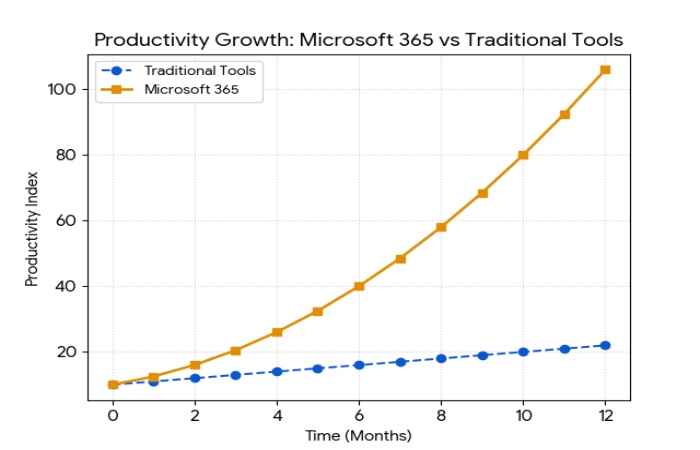
Title: Productivity Growth: Microsoft 365 vs Traditional Tools
Graph Type: Line Graph
- X-axis: Time (Months)
- Y-axis: Productivity Index
Lines:
- Traditional Tools → gradual growth
- Microsoft 365 → steep growth due to AI + collaboration
Microsoft 365 Copilot
| Function | Example |
| Writing | Draft emails, documents |
| Analysis | Excel insights |
| Meetings | Summaries in Teams |
| Presentations | Auto-generate slides |
Copilot is Microsoft’s long-term strategy to dominate AI productivity.
Buying Decision Guide
| User Type | Recommendation |
| Students | Personal plan |
| Freelancers | Personal / Business Basic |
| Small businesses | Business Standard |
| Enterprises | E3 / E5 |
| AI-focused teams | Add Copilot |
Expert Review
Microsoft 365 excels in integration, scalability, and enterprise readiness. It’s not the easiest tool for beginners, but it becomes indispensable at scale.
Real User Insight (Reddit)
“Copilot works best when treated as a context-aware assistant.”
“Most users aren’t shown how to use it well.”
Analysis
- Strength: Deep integration across apps
- Weakness: Learning curve + underutilized AI
Conclusion
Microsoft 365 is no longer just software—it’s a productivity infrastructure powered by AI, cloud computing, and collaboration. Its biggest strength is not Word or Excel individually, but how everything works together: files, meetings, communication, and now intelligent automation.
For beginners, it may feel complex. For professionals and businesses, it is one of the most powerful productivity ecosystems available today. If you work digitally, Microsoft 365 is not optional—it’s a competitive advantage.
FAQs
Is Microsoft 365 worth it in 2026?
Yes. Especially for professionals, businesses, and teams needing collaboration and AI productivity.
Can I use Microsoft 365 offline?
Yes, but full features require internet connectivity.
Is Copilot included?
Not always. It is often an add-on subscription.
Is Microsoft 365 better than Google Workspace?
- Microsoft → power + AI + enterprise
- Google → simplicity + browser-first
How often is Microsoft 365 updated?
Continuously, with new features added regularly.