A server is a system (hardware + software) that delivers services, data, or resources to other devices over a network—but in today’s digital ecosystem, that definition only scratches the surface. Modern servers power everything from simple websites to complex cloud infrastructures, often operating as part of vast, distributed systems rather than single machines.
According to industry analysis from International Data Corporation, global demand for servers continues to grow rapidly due to cloud computing, AI workloads, and data-driven applications, highlighting their critical role in modern IT infrastructure. Leading providers like Dell Technologies and Hewlett Packard Enterprise further emphasize that businesses are shifting toward scalable and hybrid server environments to balance performance, cost, and flexibility.
Table of Contents
What Is a Server?
A server is best understood as a role in a network rather than a specific device. Any system that responds to requests from other systems (clients) is acting as a server.
When you:
- Open a website
- Watch Netflix
- Send an email
You are interacting with multiple servers working together.
Modern servers are:
- Physical machines (data centers)
- Virtual machines (cloud)
- Containers (microservices architecture)
How Servers Work
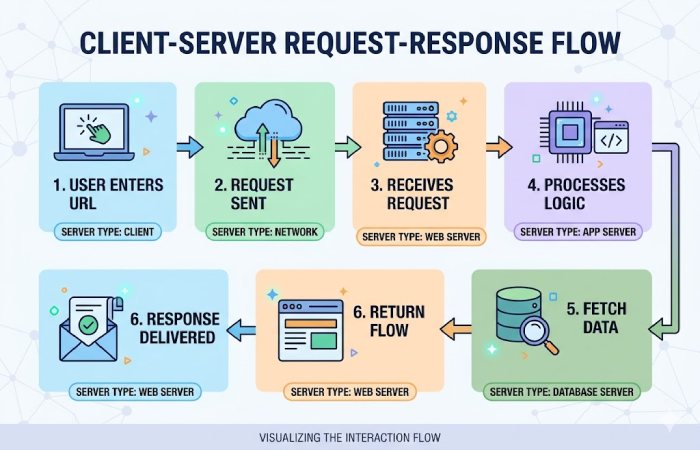
When a user interacts with an application, multiple servers collaborate:
- Client sends a request
- The web server receives it
- Application server processes logic
- Database server fetches data
- Response is returned
Types of Servers
| Server Type | Function | Real-World Example |
| Web Server | Delivers websites | Blogs, eCommerce |
| Application Server | Runs logic | Banking apps |
| Database Server | Stores data | User records |
| File Server | File sharing | Office networks |
| Mail Server | Email services | Gmail |
| Cloud Server | Virtualized computing | AWS, Azure |
Server Hardware Specifications
Understanding specs is critical for performance decisions.
| Component | Description | Typical Range |
| CPU | Processing power | 4–128 cores |
| RAM | Memory for tasks | 16GB–1TB+ |
| Storage | SSD/HDD/NVMe | 500GB–100TB |
| Network | Data transfer speed | 1Gbps–100Gbps |
| Power Supply | Redundancy | Dual PSU |
Example Real Configurations
| Model | CPU | RAM | Storage |
| HP ProLiant DL380 | Intel Xeon | 128GB | 24TB |
| Dell PowerEdge R650 | Dual Xeon | 128GB | SSD/NVMe |
| Lenovo ThinkSystem | AMD EPYC | 64GB | SSD |
These configurations align with real enterprise server listings.
Pricing of Server
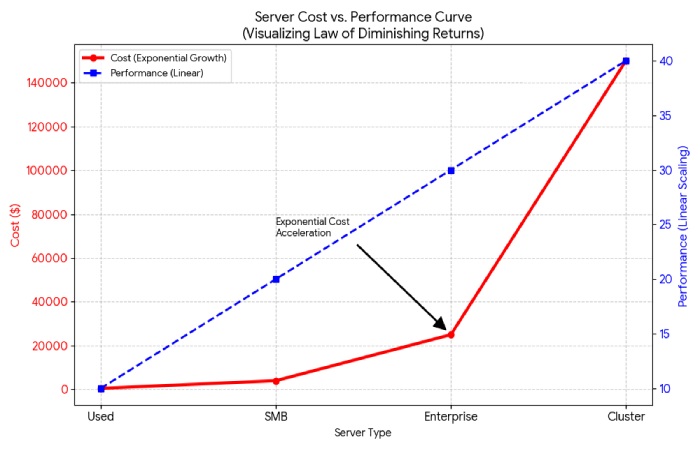
Server costs vary massively depending on scale, configuration, and deployment.
| Server Type | Price Range (Global) |
| Used / Refurbished | $400 – $1,000 |
| Small Business Server | $1,500 – $5,000 |
| Enterprise Server | $5,000 – $20,000+ |
| Data Center Cluster | $50,000 – $300,000+ |
Real-world listings show:
- Refurbished servers starting ~₹36,999 (~$450)
- Enterprise systems reaching ₹7,00,000+ (~$8,000+)
Hardware costs account for only 18–25% of total ownership costs, with power, maintenance, and downtime accounting for the majority.
Server Brands Comparison
Top Server Brands
- Dell Technologies
- Hewlett Packard Enterprise (HPE)
- IBM / Lenovo
- Cisco
- Supermicro
Market Insight
- Dell: ~31–33% global share
- HPE: ~27–29%
- Widely used in Fortune 500 companies
| Feature | Dell | HPE | Lenovo | Supermicro |
| Market Share | High | High | Medium | Growing |
| Price | Moderate | Slightly higher | Competitive | Low |
| Support | Excellent | Strong | Good | Limited |
| Customization | Flexible | Moderate | Flexible | High |
| Best For | Enterprises | Mission-critical | Balanced | Budget builds |
Real-World Reviews
From real IT users (Reddit discussions):
“Dell support and parts availability are better.”
“HP hardware quality feels more polished.”
“Supermicro is cheaper but lacks support.”
What This Means
- Dell = reliability + support
- HPE = performance + ecosystem
- Supermicro = cost-effective but risky
Server Types Comparison
| Type | Description | Use Case | Cost |
| Tower Server | Standalone unit | Small business | Low |
| Rack Server | Mounted in racks | Data centers | Medium |
| Blade Server | Compact modular | Large enterprises | High |
Physical vs Virtual vs Cloud Servers
| Feature | Physical | Virtual | Cloud |
| Ownership | Full | Shared | On-demand |
| Cost | High upfront | Moderate | Pay-as-you-go |
| Scalability | Limited | Flexible | Highly scalable |
| Maintenance | Manual | Moderate | Provider-managed |
Alternatives to Traditional Servers
Modern businesses often use alternatives:
| Alternative | Description | Example |
| Cloud Computing | On-demand servers | AWS, Azure |
| Serverless | No server management | AWS Lambda |
| Edge Computing | Local processing | IoT systems |
Servers Pros and Cons
Pros
| Pros | Explanation |
| High performance | Handles heavy workloads |
| Centralized control | Easy data management |
| Scalability | Supports growth |
| Reliability | Redundant systems |
Cons
| Cons | Explanation |
| High cost | Hardware + maintenance |
| Complexity | Requires expertise |
| Downtime risk | If not managed well |
| Energy consumption | Expensive to run |
Where to Buy Servers
| Platform | Type | Best For |
| Official Vendors (Dell, HPE) | New | Enterprise |
| Resellers | Discounted | SMB |
| Cloud Providers | Virtual | Startups |
| Refurbished Marketplaces | Used | Budget buyers |
- Refurbished servers can save 50–70% cost
- Cloud eliminates upfront investment
Server Use Cases
| Industry | Server Usage |
| Healthcare | Patient data systems |
| Finance | Transaction processing |
| E-commerce | Websites + payments |
| Gaming | Multiplayer servers |
| AI/ML | Data processing clusters |
FAQs
- What is a server in simple terms?
A server is a system that provides data or services to other computers over a network.
- Do I need a server for a website?
Yes. Every website runs on a server (shared, VPS, or cloud).
- What is the difference between a server and a computer?
A server provides services; a computer consumes them.
- How much does a server cost?
- Entry-level: $400
- Business: $2,000–$10,000
- Enterprise: $10,000+
- Which server brand is best?
Depends on use case:
- Dell → support
- HPE → enterprise performance
- Supermicro → budget
- Can I build my own server?
Yes, but enterprise servers offer better reliability and support.
- What is cloud vs server?
Cloud servers are virtual and hosted remotely, while physical servers are on-premise.
Final Verdict
Servers are no longer just standalone machines—they are dynamic, scalable systems that power every digital interaction globally. While beginners often focus on hardware specifications or upfront pricing, the real decision lies in balancing performance, scalability, and total cost of ownership.
Modern businesses increasingly prefer cloud and virtual servers over traditional setups due to flexibility and efficiency, while enterprises still rely on high-performance physical infrastructure for critical workloads. Ultimately, choosing the right server is less about buying the most powerful option and more about aligning infrastructure with actual needs, growth potential, and long-term operational strategy.