Input or Output (I/O) operations form the foundation of how computers interact with the outside world. Whether it’s typing on a keyboard, loading a webpage, saving a file, or streaming data, every action depends on efficient data transfer between systems and devices. While often introduced as a basic concept, I/O plays a critical role in real-world computing performance, system design, and scalability. Understanding how I/O works is essential not just for beginners learning computing fundamentals, but also for professionals optimizing applications, databases, and modern cloud-based systems.
Table of Contents
Key Concepts in I/O Operations
| Concept | Explanation | Why It Matters |
| Data Transfer | Movement of data between system and external environment | Fundamental computing function |
| Throughput | Amount of data transferred per second | Impacts performance |
| Latency | Time delay in I/O operations | Affects responsiveness |
| IOPS (Input/Output Operations Per Second) | Measures I/O performance | Critical for databases & storage |
| Buffering | Temporary data storage during transfer | Reduces delays |
| Interrupts | Signals that notify CPU about I/O completion | Improves efficiency |
How I/O Operations Work
At a system level, I/O operations involve coordination between hardware and software.
Step-by-Step Process
- User or program initiates request
- OS sends command to device controller
- Data transfer begins
- CPU may wait or continue (depending on type)
- Operation completes and system responds
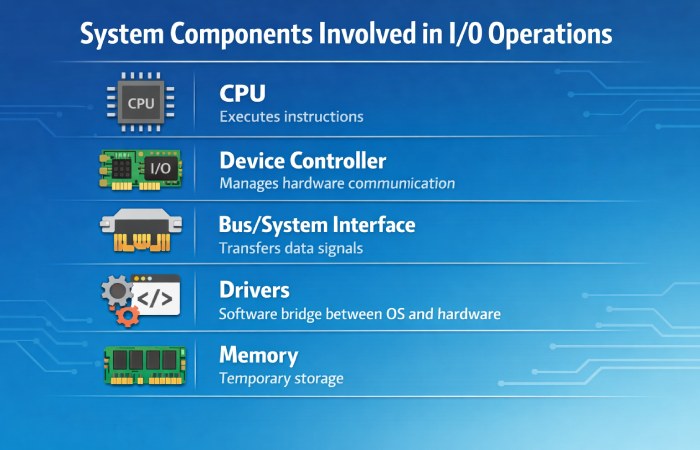
System Components Involved
Modern systems rely heavily on controllers and drivers to manage data flow efficiently.
Types of I/O Operations
| Type | Description | Example |
| Synchronous (Blocking) | Waits until operation completes | File reading |
| Asynchronous (Non-blocking) | Continues execution | Web requests |
| Buffered I/O | Uses temporary memory | Streaming |
| Direct I/O | Bypasses buffer | High-performance systems |
| Memory-Mapped I/O | Treats devices as memory | Embedded systems |
Types of I/O Control
| Control Method | Description | Performance |
| Programmed I/O (PIO) | CPU controls every operation | Slow |
| Interrupt-Driven I/O | Device signals CPU when ready | Moderate |
| Direct Memory Access (DMA) | Transfers data without CPU involvement | Fast |
DMA is widely used because it reduces CPU overhead and improves efficiency.
Common I/O Techniques Used in Real Systems
| Technique | Use Case | Benefit |
| Polling | Checking device status repeatedly | Simple but inefficient |
| Interrupt Handling | Event-driven systems | Saves CPU cycles |
| Spooling | Printing queues | Prevents bottlenecks |
| Caching | Frequently accessed data | Improves speed |
| Scheduling | Order of operations | Optimizes performance |
Error Handling and Performance Optimization
Common I/O Errors
| Error Type | Cause | Solution |
| Device Failure | Hardware malfunction | Replace/repair |
| Timeout | Slow response | Retry mechanism |
| Data Corruption | Transfer issues | Validation checks |
| Permission Error | Access restrictions | Update permissions |
Performance Optimization Techniques
| Strategy | Impact |
| Use SSD instead of HDD | Faster read/write |
| Implement caching | Reduces repeated I/O |
| Use asynchronous I/O | Improves concurrency |
| Optimize queries (DB) | Reduces disk access |
| Batch processing | Minimizes overhead |
Tools Used in I/O Operations
Software Tools
| Tool | Purpose | Pricing |
| Linux iostat | Monitor I/O stats | Free |
| iotop | Track real-time I/O usage | Free |
| Windows Performance Monitor | System diagnostics | Free |
| Apache JMeter | Load testing | Free |
| Wireshark | Network I/O analysis | Free |
Hardware Tools / Devices
| Device | Purpose | Price Range (Global) |
| SSD (Solid State Drive) | Storage I/O | $50 – $300 |
| HDD | Bulk storage | $30 – $150 |
| Network Interface Card | Network I/O | $20 – $200 |
| External Drives | Data transfer | $40 – $250 |
Specifications That Define I/O Performance
| Specification | Description | Example |
| IOPS | Operations per second | 100K+ for SSD |
| Throughput | Data transfer rate | MB/s or GB/s |
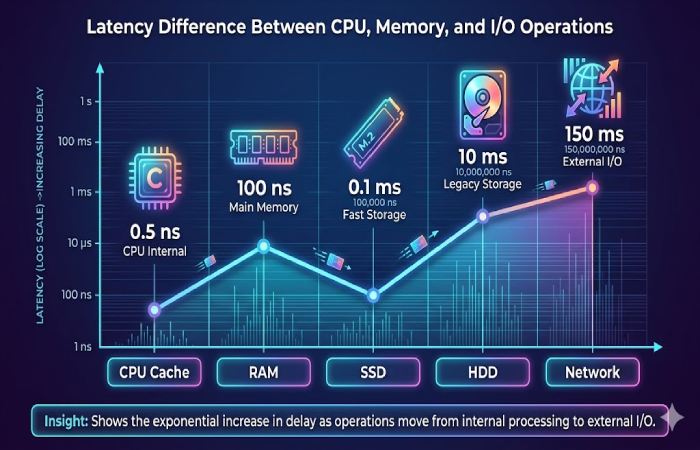
| Latency | Delay in response | ms or µs |
| Bandwidth | Max transfer capacity | Network speed |
| Queue Depth | Number of operations queued | High = better throughput |
Pricing & Where to Buy
Where to Buy I/O Hardware
| Platform | Region | Notes |
| Amazon | Global | Wide variety |
| Newegg | US/Global | Tech-focused |
| Alibaba | Global | Bulk purchasing |
| Best Buy | US/Canada | Retail electronics |
| Flipkart | India | Consumer devices |
Typical Cost Comparison
| Device Type | Budget Option | Premium Option |
| SSD | $50 (256GB) | $300 (2TB NVMe) |
| HDD | $30 (1TB) | $150 (8TB) |
| Network Hardware | $20 | $200+ |
Comparisons with Other Concepts
I/O vs CPU Processing
| Factor | I/O Operations | CPU Processing |
| Speed | Slow | Fast |
| Dependency | External systems | Internal |
| Bottleneck | High | Lower |
| Optimization | Complex | Easier |
I/O vs Memory Operations
| Factor | I/O | Memory |
| Speed | Slow | Fast |
| Access | External/Internal | Internal |
| Cost | Higher latency | Lower latency |
Alternatives to Traditional I/O Systems
| Alternative | Description | Use Case |
| In-Memory Computing | Data stored in RAM | High-speed apps |
| Edge Computing | Local processing | IoT systems |
| Caching Layers | Reduces repeated I/O | Web apps |
| Data Streaming | Continuous flow | Real-time analytics |
Pros and Cons of I/O Operations
Advantages
| Pros | Explanation |
| Enables communication | Core function of computing |
| Supports scalability | Works across systems |
| Handles large data | Essential for storage/network |
| Flexible | Works with multiple devices |
Disadvantages
| Cons | Explanation |
| Slower than CPU | Major bottleneck |
| Hardware dependent | Requires devices |
| Latency issues | Delays processing |
| Complexity | Requires optimization |
Real-World Review
From a system design perspective:
- Beginners see I/O as device interaction
- Professionals see I/O as performance architecture
In large-scale systems (cloud, AI, databases), optimizing I/O often delivers 10x better performance gains than CPU upgrades
FAQs
- What is an I/O operation in simple terms?
An I/O operation is any process where a computer receives or sends data.
- Why are I/O operations slow?
Because they involve external devices or systems, which operate much slower than CPU and memory.
- What is IOPS?
IOPS measures how many input/output operations a system can perform per second.
- What is the difference between input and output?
Input sends data into the system, while output sends data out.
- What is DMA in I/O?
Direct Memory Access allows data transfer without CPU involvement, improving efficiency.
Conclusion
Input and Output operations are far more than simple data exchanges—they are the backbone of system performance and user experience. From hardware devices to cloud infrastructure, efficient I/O handling determines how fast, reliable, and scalable a system can be. As computing continues to evolve with big data, AI, and distributed systems, the importance of optimizing I/O only grows. A strong grasp of I/O concepts enables developers and engineers to move beyond basic functionality and build systems that are not only functional but also high-performing and future-ready.