The Store for Windows (Microsoft Store) is Microsoft’s built-in digital marketplace designed to simplify how users discover, install, and manage applications on Windows devices. While it started as a limited app hub, it has evolved—especially with Windows 11—into a more flexible platform that supports both modern apps and traditional desktop software. For beginners, it offers a safe and easy starting point; for advanced users, it serves as a complementary tool rather than a complete solution.
Table of Contents
What Is Store for Windows?
The Microsoft Store is Microsoft’s official app distribution platform integrated into Windows OS.
| Attribute | Details |
| Official Name | Microsoft Store |
| Platform | Windows 10 & Windows 11 |
| Type | Digital app marketplace |
| Ownership | Microsoft |
| Launch | 2012 (as Windows Store) |
| Global Reach | 240+ countries |
Unlike traditional Windows installations where users download .exe files from websites, the Microsoft Store provides a controlled, verified environment. This reduces malware risks and simplifies app management. Over time, especially after Windows 11, it evolved into a hybrid platform supporting Win32, UWP, PWA, and Electron apps, making it far more versatile than its early versions.
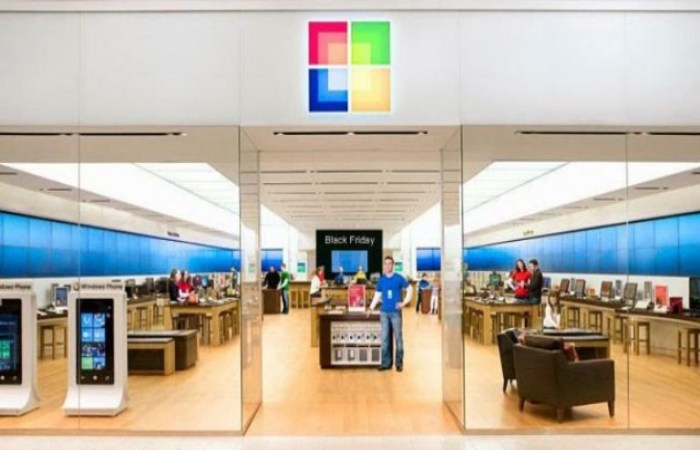
Where to Download Microsoft Store
| Method | Description |
| Pre-installed | Comes built into Windows 10/11 |
| Windows Search | Type “Microsoft Store” |
| Web Version | Open Microsoft Store Online |
| Reinstall | Via PowerShell or Microsoft support tools |
Most users do not need a separate installer because the Store is part of Windows. If missing, it usually indicates a system issue, not a standard installation process.
What Microsoft Store for Windows Offers
| Offering Category | Details | Examples |
| Applications | Productivity, utilities, creative tools | WhatsApp, Zoom, Adobe Express |
| Games | Free and paid PC games | Asphalt 9, Minecraft |
| Movies & TV | Buy or rent digital content | Hollywood and regional films |
| Extensions & Tools | Browsers, plugins, system tools | Password managers, codecs |
| Developer Apps | IDEs and coding tools | Visual Studio, Python tools |
| Progressive Web Apps (PWAs) | Web-based apps packaged for Windows | Twitter, Pinterest |
| Automatic Updates | Apps update in the background | System-managed updates |
| Library Management | Central dashboard for installed apps | Update, reinstall, manage apps |
| Cross-Device Sync | Sync apps across devices via account | Same apps on multiple PCs |
| Secure Distribution | Verified apps via Microsoft | Reduced malware risk |
The Microsoft Store is no longer just an “app downloader.” It functions as a centralized digital ecosystem—combining software distribution, media consumption, and system-level management into a single interface. This positioning is critical for users who prefer simplicity, security, and integration over manual control.
Pricing Model
| Category | Price Range (Global) |
| Free Apps | ₹0 |
| Basic Paid Apps | ₹100 – ₹1,000 |
| Premium Apps | ₹1,000 – ₹10,000+ |
| In-app Purchases | Variable |
| Subscription Apps | Monthly/Yearly |
Microsoft Store itself is completely free to use, and there are no account or transaction fees for users. However, apps can be priced by developers in various ways, including one-time purchases, subscriptions, or in-app purchases.
Specifications & Technical Capabilities
| Feature | Specification |
| Supported OS | Windows 10, Windows 11 |
| App Types | Win32, UWP, PWA, Electron |
| Update System | Automatic |
| Security | Microsoft verification + sandboxing |
| Distribution | Cloud-based |
| Integration | Microsoft account |
| File Types | Appx, MSIX, EXE (via listing) |
The biggest evolution is support for traditional desktop apps (Win32), which removed a major limitation. Previously, developers had to rebuild apps specifically for the Store. Now, they can publish existing apps directly, significantly expanding the ecosystem.
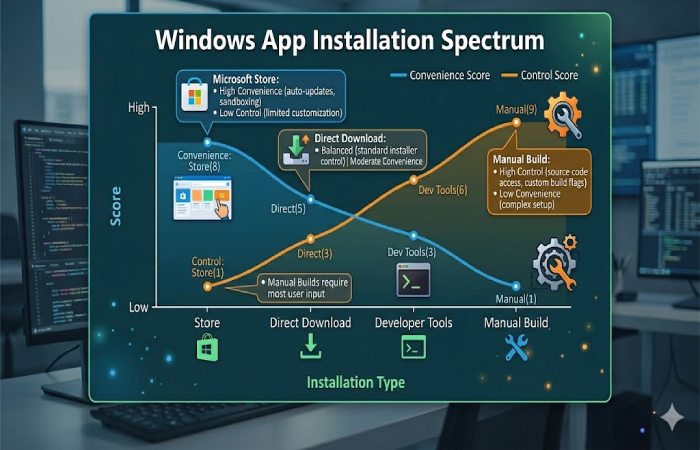
Microsoft Store vs Others
| Feature | Microsoft Store | Direct Download (.exe) | Steam | Apple App Store |
| Safety | High | Medium–Low | High | High |
| App Variety | Moderate | Very High | Gaming-focused | Moderate |
| Ease of Use | Very Easy | Moderate | Easy | Easy |
| Updates | Automatic | Manual | Automatic | Automatic |
| Control | Limited | Full | Medium | Limited |
| Platform | Windows | Windows | Windows/macOS | Apple ecosystem |
Microsoft Store sits in a middle-ground ecosystem—more open than Apple’s App Store but more controlled than traditional Windows installations. This hybrid model is intentional: it allows Microsoft to maintain security while preserving Windows’ legacy flexibility.
Alternatives to Microsoft Store
| Alternative | Best For | Website |
| Official Websites | Latest versions | Vendor sites |
| Steam | Gaming | store.steampowered.com |
| Epic Games Store | Free games | epicgames.com |
| Chocolatey | Developers | chocolatey.org |
| Ninite | Bulk installs | ninite.com |
For advanced users, tools like Chocolatey or direct downloads provide faster updates and broader access. Microsoft Store is still catching up in terms of catalog depth and developer adoption.
7. Pros and Cons
Pros
| Advantage | Why It Matters |
| High security | Verified apps reduce malware |
| Easy installation | One-click install |
| Automatic updates | No manual effort |
| Centralized management | All apps in one place |
| Global availability | Available worldwide |
Cons
| Limitation | Impact |
| Limited app selection | Missing niche tools |
| Slower updates | Compared to direct installs |
| Less control | Limited customization |
| Quality inconsistency | Some low-quality apps reported |
Detailed Review
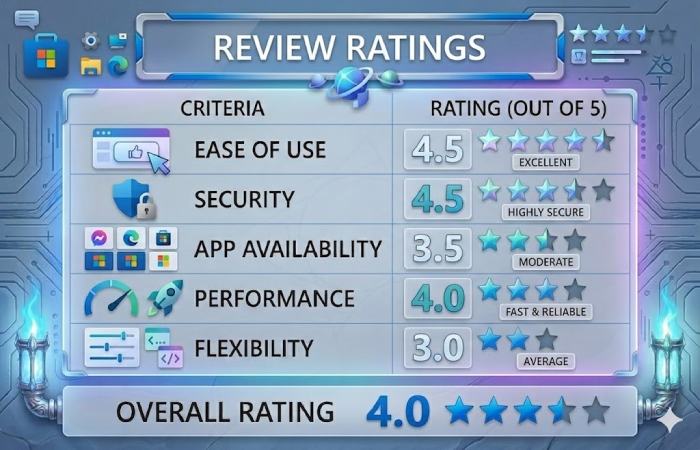
The Microsoft Store has significantly improved in recent years, especially with Windows 11. It now supports mainstream apps like Spotify and Discord, as well as productivity tools, making it far more practical than before. However, it still lacks the depth and speed of direct installations, which prevents it from becoming the default choice for professionals.
When Should You Use It?
| User Type | Recommendation |
| Beginners | Strongly recommended |
| Students | Recommended |
| Office users | Recommended |
| Developers | Limited use |
| Power users | Use alternatives |
The Store is best viewed as a “safe starting point” rather than a complete software ecosystem.
FAQs
- Is Microsoft Store free?
Yes, it is completely free to use. You only pay for apps or in-app purchases.
- Can I install apps without Microsoft Store?
Yes, via direct downloads (.exe files), which offer more flexibility.
- Is Microsoft Store safe?
Yes, apps are verified and run in a controlled environment, reducing malware risk.
- Why are some apps missing?
Not all developers publish on the Store due to policies or preferences.
- Does Microsoft Store work globally?
Yes, it operates in 240+ countries and regions.
Conclusion
The Microsoft Store for Windows has matured into a reliable and increasingly relevant platform, particularly for users who value safety, convenience, and a streamlined experience. While it cannot fully replace traditional software installation methods—especially for professionals who require advanced tools—it plays a crucial role as a trusted gateway into the Windows ecosystem. The smartest approach today is not choosing between the Store and direct downloads, but combining both strategically to balance convenience with control.